
タッチスクリーンディスプレイはRaspberry Pi 4プロジェクトに価値がありますか?
ニュース
Apr-09-2025
コンテンツメニュー
a href="#1.-オリジナルの解像度-Raspberry-Pi-7-inch-touchscreen-display?">1.オリジナルのRaspberry Pi 7インチタッチスクリーンディスプレイの解像度はどれくらいですか?
● 引用
はじめに
Raspberry Pi プロジェクトの機能とユーザー エクスペリエンスを向上させる場合、タッチスクリーン ディスプレイを組み込むことは状況を大きく変える可能性があります。Raspberry Pi 4 は、処理能力とメモリが向上しており、インタラクティブなインターフェイスを必要とするプロジェクトに特に適しています。しかし、Raspberry Pi 4のプロジェクトにはタッチスクリーンディスプレイが価値があるのか、という疑問が残ります。この記事では、Raspberry Pi 4 に焦点を当てて、Raspberry Pi プロジェクトにおけるタッチスクリーン ディスプレイの利点、制限、およびアプリケーションについて詳しく説明します。
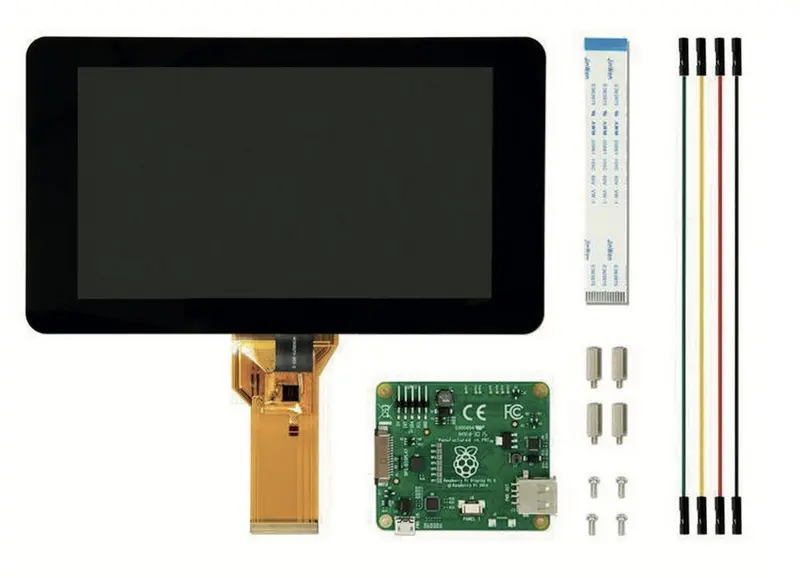
タッチスクリーン ディスプレイの利点
タッチスクリーン ディスプレイには、Raspberry Pi プロジェクトにとって魅力的ないくつかの利点があります。まず、ユーザーがキーボードやマウスを必要とせずにデバイスを直接操作できるユーザーフレンドリーなインターフェイスを提供します。これは、スマート ミラー、フォト フレーム、インタラクティブ キオスクなど、実践的な対話が不可欠なプロジェクトに特に役立ちます。さらに、タッチスクリーン ディスプレイを使用すると、ユーザーが単一のインターフェイスからデバイスを制御できるため、プロジェクトの携帯性が向上します。
7 インチ モデルなどの公式 Raspberry Pi タッチスクリーン ディスプレイは、Raspberry Pi ボードとシームレスに連携するように設計されています。マルチタッチ機能やコンパクトなサイズなどの機能を備えているため、設置面積が小さいプロジェクトに最適です。新しい Touch Display 2 モデルは、解像度が 1280x720 ピクセルに向上しており、より高い視覚的鮮明さが必要なアプリケーションに適しています。
タッチスクリーンディスプレイの制限
Raspberry Pi プロジェクト用のタッチスクリーン ディスプレイには、その利点にもかかわらず、いくつかの制限があります。オリジナルの 7 インチ タッチスクリーン ディスプレイの解像度は 800x480 ピクセルで、高解像度のビジュアルを必要とするアプリケーションには十分ではない可能性があります。さらに、ディスプレイのサイズにより、大型モニターと比較してマルチタスク機能が制限される可能性があります。ただし、これらの制限は、移植性とインタラクティブ性を優先するプロジェクトでは許容されることがよくあります。
もう一つの考慮事項は互換性です。オリジナルのタッチスクリーン ディスプレイは、追加のアダプターのない新しい Raspberry Pi モデルには理想的ではない可能性がありますが、タッチ ディスプレイ 2 は最新のボードとの互換性を高めるように設計されています。ディスプレイのエッジもデリケートな場合があり、取り扱いに注意する必要があります。
Raspberry Pi プロジェクトにおけるタッチスクリーン ディスプレイの応用
タッチスクリーン ディスプレイは、フォト フレームやインターネット ラジオなどの単純なアプリケーションから、スマート ミラーやインタラクティブ ダッシュボードなどのより複雑なセットアップまで、幅広い Raspberry Pi プロジェクトで使用できます。たとえば、Raspberry Pi フォト フレームをタッチスクリーン ディスプレイで強化して、ユーザーがディスプレイ上で直接写真を移動したり、設定を調整したりできるようにすることができます。
スマートミラー
スマートミラーもタッチスクリーン ディスプレイの人気のあるアプリケーションです。これらのミラーはあなたの画像を反映するだけでなく、ニュース、天気予報、カレンダー イベントなどの有用な情報も表示します。タッチスクリーン インターフェイスにより、ユーザーはこの情報を直接操作できるため、どの家庭にも便利に追加できます。
ポータブルデバイス
Raspberry Piタブレットなど、携帯性が必要なプロジェクトには、タッチスクリーンディスプレイが不可欠です。これにより、ユーザーは外部周辺機器を必要とせずにデバイスを制御できるため、どこでも使用できる自己完結型ユニットになります。
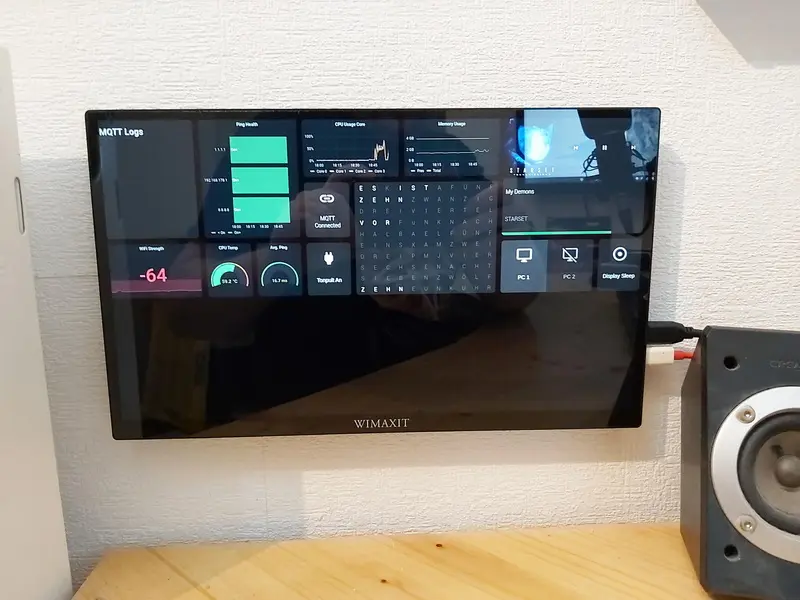
タッチスクリーン ディスプレイはそれだけの価値がありますか?
タッチスクリーン ディスプレイが Raspberry Pi 4 プロジェクトに価値があるかどうかは、特定のニーズと目標によって異なります。プロジェクトにユーザーフレンドリーなインターフェイス、携帯性、インタラクティブ性が必要な場合は、タッチスクリーン ディスプレイが貴重な追加機能となります。ただし、高解像度のビジュアルや大規模なマルチタスクが必要な場合は、従来のモニターの方が適している可能性があります。
コストに関する考慮事項タッチ
スクリーン ディスプレイのコストも考慮すべき要素です。オリジナルの 7 インチ ディスプレイと新しい Touch Display 2 の価格はどちらも約 60 ドルで、愛好家にも専門家にも同様に利用できます。ただし、予算が懸念され、高解像度が優先されない場合でも、元のディスプレイが実行可能な選択肢となる可能性があります。
まとめ
結論として、タッチスクリーン ディスプレイは、Raspberry Pi 4 プロジェクト、特にインタラクティブ性と携帯性を優先するプロジェクトにとって価値のある投資となります。解像度と互換性の点では制限がありますが、強化されたユーザー エクスペリエンスとコンパクトな設計の利点により、タッチスクリーン ディスプレイは幅広いアプリケーションに最適です。テクノロジーが進化し続けるにつれて、解像度と互換性の将来の向上により、Raspberry Pi プロジェクトにおけるタッチスクリーン ディスプレイの価値がさらに高まるでしょう。
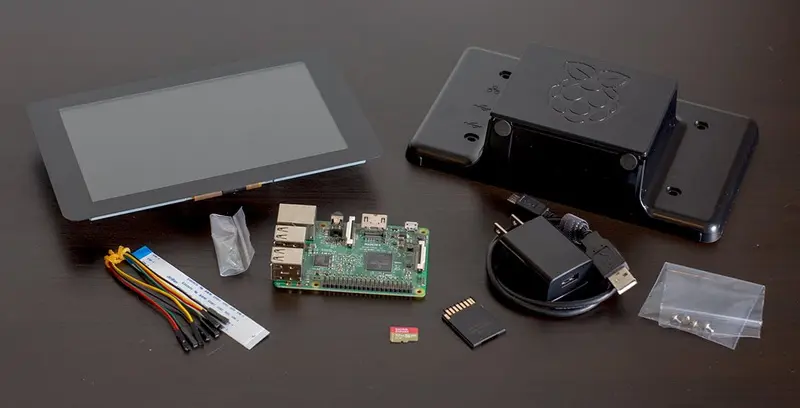
よくある質問
Raspberry Pi プロジェクトでのタッチスクリーン ディスプレイの使用に関する一般的な質問と回答をいくつか示します
。オリジナルのRaspberry Pi 7インチタッチスクリーンディスプレイの解像度はどれくらいですか?
オリジナルの Raspberry Pi 7 インチ タッチスクリーン ディスプレイの解像度は 800x480 ピクセルです。
2. Raspberry Pi Touch Display 2 はすべての Raspberry Pi モデルと互換性がありますか?
Raspberry Pi Touch Display 2は、DSIコネクタのないZeroシリーズとKeyboardシリーズを除き、Raspberry Pi 1B+以降のすべてのモデルと互換性があります。
3. タッチスクリーン ディスプレイと HDMI モニターを Raspberry Pi で同時に使用できますか?
はい、Raspberry Pi でタッチスクリーン ディスプレイと HDMI モニターの両方を同時に使用できます。
4. タッチスクリーン ディスプレイを Raspberry Pi に接続するにはどうすればよいですか?
タッチスクリーン ディスプレイを Raspberry Pi に接続するには、リボン ケーブルを使用してディスプレイを DSI ポートに接続し、GPIO ポート経由で電源を供給する必要があります。
5. Raspberry Pi プロジェクトにおけるタッチスクリーン ディスプレイの一般的なアプリケーションにはどのようなものがありますか?
一般的な用途には、フォトフレーム、スマートミラー、インターネットラジオ、ポータブルタブレットなどがあります。
引用
[1] https://www.crazypi.com/raspberry-pi-touchscreen-display-projects
[2] https://www.reshine-display.com/can-the-pi-foundation-7-touchscreen-replace-a-monitor-for-raspberry-pi.html
[3] https://www.tomshardware.com/raspberry-pi/raspberry-pi-touch-display-2-review-a-touch-of-class
[4] https://www.zdnet.com/article/how-to-add-a-touchscreen-to-your-raspberry-pi-projects/
[5] https://www.raspberrypi.com/documentation/accessories/display.html
[6] https://www.raspberrypi.com/news/how-to-use-the-raspberry-pi-touch-display/
[7] https://www.youtube.com/watch?v=SCLr-p6sbn0
[8] https://www.reddit.com/r/raspberry_pi/comments/dl1eab/raspberry_pi_4_touchscreen_misbehaving_when_using/
[9] https://www.raspberrypi.com/documentation/accessories/touch-display-2.html
[10] https://www.reshine-display.com/is-the-7-inch-raspberry-pi-touchscreen-worth-it-in-2025.html
[11] https://www.raspberrypi.com/news/getting-started-with-raspberry-pi-touch-display-2/
[12] https://www.reddit.com/r/raspberry_pi/comments/4ef7lg/is_the_raspberry_pi_7_touch_screen_worth_it/
[13] https://raspberrypi.stackexchange.com/questions/104822/raspberry-pi-4-touchscreen-misbehaving-when-using-a-secondary-monitor
[14]https://www.youtube.com/watch?v=J69-bxOSMC8
[15] https://www.yodeck.com/use-cases/raspberry-pi-screens/
[16] https://hackaday.io/project/19035-zerophone-a-raspberry-pi-smartphone/log/57417-why-not-a-large-display-with-a-touchscreen
[17] https://www.raspberrypi.com/products/raspberry-pi-touch-display/
[18] https://forums.raspberrypi.com/viewtopic.php?t=317885
[19] https://forums.raspberrypi.com/viewtopic.php?t=263233
[20] https://www.youtube.com/watch?v=CTCYlON4wBU
[21] https://www.reddit.com/r/hardware/comments/3kdd7d/raspberry_pi_touchscreen_display_is_best_for_your/
[22] https://forum.xojo.com/t/pi-official-7-touch-screen-some-problems/79965
[23] https://www.reddit.com/r/raspberry_pi/comments/1ik3myy/turning_an_old_touchscreen_into_a_home_dashboard/
[24] https://www.youtube.com/watch?v=rHwrwz3kv5o
[25]https://www.youtube.com/watch?v=M-eCYlhulrg
[26] https://thepihut.com/collections/raspberry-pi-display-screen-cases
[27] https://www.youtube.com/watch?v=gpyYCTgJO88
[28] https://thepihut.com/collections/touchscreen-displays-for-raspberry-pi
[29] https://uperfect.com/products/raspberry-pi-case-with-screen
[30] https://ca.pinterest.com/kwakman99/raspberry-pi-information-display/
[31]https://www.aliexpress.com/i/4001069074258.html
[32] https://www.slashgear.com/1568223/cool-projects-with-raspberry-pi-and-display/
[33] https://au.element14.com/multicomp-pro/asm-1900147-21/rpi-touch-screen-case-black/dp/3106152
[34] https://thepihut.com/collections/raspberry-pi-screens
[35] https://www.cytron.io/p-raspberry-pi-7in-touch-screen-with-case
[36] https://forums.raspberrypi.com/viewtopic.php?t=335630
[37] http://wiki.geekworm.com/Raspberry_Pi_Official_7_Touch_Screen_SKU:414167
[38] https://www.raspberrypi.com/documentation/accessories/monitor.html
[39] https://www.welectron.com/Raspberry-Pi-4-Touch-Screen-Kit-Black
[40] https://raspberrypi.stackexchange.com/questions/28/how-can-i-determine-if-a-given-touchscreen-is-compatible
[41]https://raspberry.piaustralia.com.au/products/5-inch-lcd-hdmi-touch-screen-display-for-raspberry-pi-4
[42] https://hk.element14.com/c/raspberry-pi/raspberry-pi-peripherals-accessories/raspberry-pi-screens-displays
[43] https://www.cytron.io/amp-p-raspberry-pi-7in-touch-screen-with-case
[44] https://forums.raspberrypi.com/viewtopic.php?t=328909
[45] https://raspberrytips.com/raspberry-pi-eviciv-touchscreen-review/
[46] https://magpi.raspberrypi.com/articles/upi-b7-raspberry-pi-case-with-touchscreen-review
[47] https://www.tomshardware.com/raspberry-pi/raspberry-pi-monitor-review
[48] https://forums.raspberrypi.com/viewtopic.php?t=263505
[49] https://tutorials-raspberrypi.com/review-of-the-7-raspberry-pi-touchscreen-display/
[50] https://www.reddit.com/r/SBCGaming/comments/fdftr4/miuzei_raspberry_pi_4_4_inch_ips_touch_screen_and/
[51] https://www.youtube.com/watch?v=YHfCWSua8JA
[52] https://www.arzopa.com/blogs/guide/portable-monitors-for-raspberry-pi
[53] https://www.seeedstudio.com/blog/2019/09/29/top-20-best-raspberry-pi-4-projects-that-you-must-try-now/
[54] https://core-electronics.com.au/raspberry-pi/displays.html
[55] https://www.raspberrypi.com/products/touch-display-2/
[56] https://forums.raspberrypi.com/viewtopic.php?t=279220
[57] https://rees52.com/products/raspberry-pi-touchscreen-display-2-pi-7-inch-touchscreen-display-7-inch-display-compatible-with-raspberry-pi-3-model-b-raspberry-pi-4-model-b-raspberry-pi-5-rs9258
[58] https://hken.rs-online.com/web/p/raspberry-pi-screens/8997466
[59] https://www.farnell.com/datasheets/1958036.pdf
[60] https://forums.raspberrypi.com/viewtopic.php?t=321859
[61]https://github.com/raspberrypi/bookworm-feedback/issues/43
Related Topics
インダストリー4.0時代における産業用タッチディスプレイ技術の動向
Aug-07-2026
産業用、屋外用、商業用タッチパネル選択ガイド
Aug-07-2026
プロジェクトに最適なタッチディスプレイソリューションの選び方
Aug-07-2026
産業用静電容量式タッチスクリーンの選び方:2026年ガイド
Aug-07-2026
Get a Free Quote
✔ 16 Years Manufacture Service ★★★★★
✔ 3 Technical Experts And 52+ Project Engineers Will Assiste You
✔ Wanty Employs Over 52 Engineers, Many Of Whom Come From Leading Tft Lcd Module Companies Such As Tianma And Boe-Varitronix. Each Core Team Member Brings 15 Years Of Industry Experience.
✔ If you would like more information about our products and services, please contact us. Whether you need a standard solution or a customized one, we are here to meet your needs.
✔ Please complete the form below, and the selected location will contact you promptly. Thank you for visiting, and have a great day!
